How IPv4 Subnetting Determines Network and Host Addresses
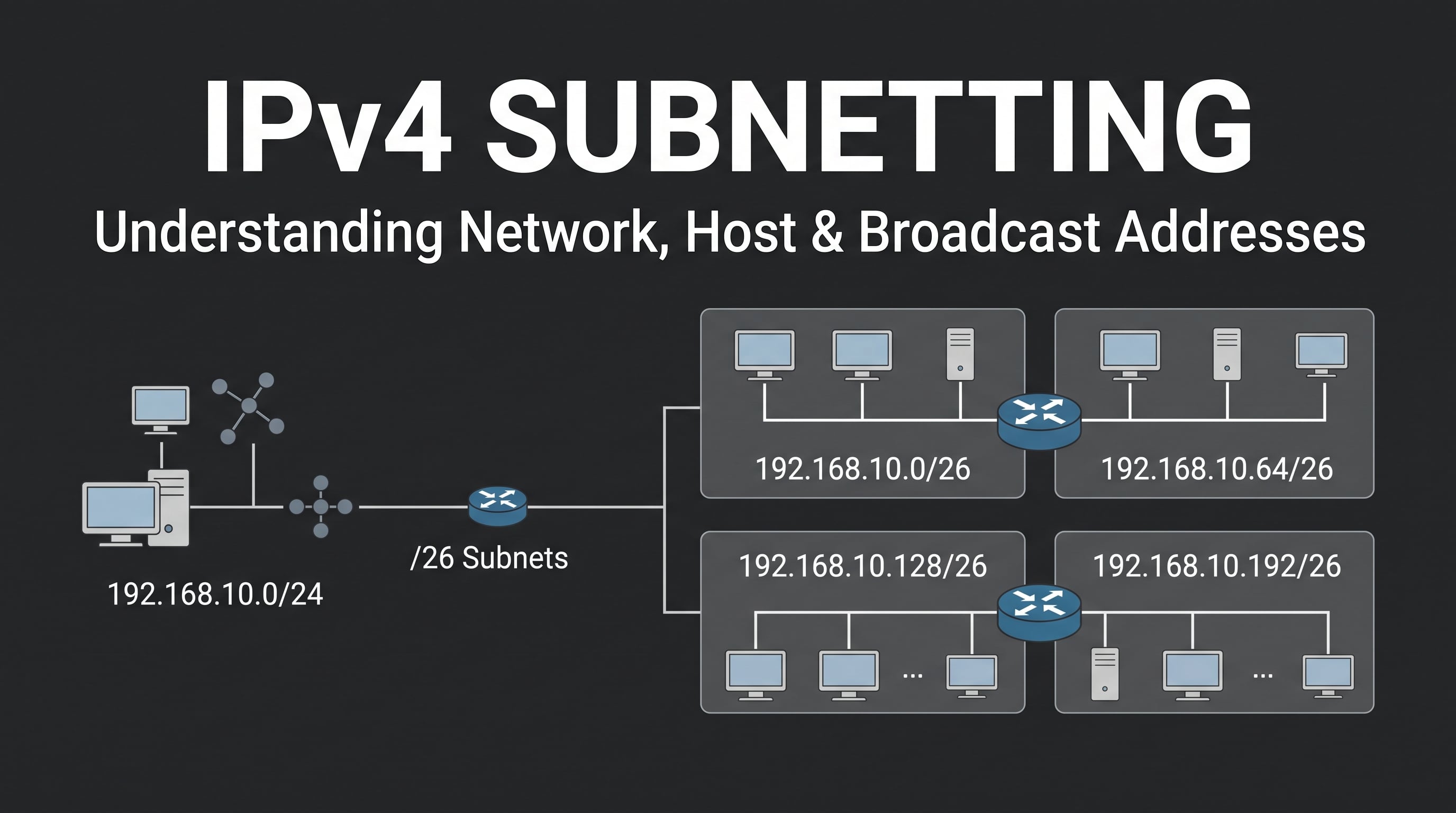
IPv4 subnetting is the process of dividing an IP network into smaller logical networks called subnets. A subnet mask determines which part of an IPv4 address identifies the network and which part identifies the host.
In practice, IPv4 subnetting helps a host determine whether a destination belongs to the same network or a different network. If the destination is on another subnet, the host sends the traffic to its default gateway so a router can forward the packet to the destination network.
In this article, I will explain how to calculate a /26 IPv4 subnet and verify the result using Cisco Packet Tracer.
Why Is IPv4 Subnetting Important?
An IPv4 address cannot be interpreted correctly without considering its subnet mask.
For example:
192.168.10.70/26
The /26 prefix tells us that 26 bits are used for the network portion, leaving 6 bits for hosts.
The corresponding subnet mask is:
255.255.255.192
With this mask, the original 192.168.10.0/24 network can be divided into four /26 subnets.
This means subnetting determines:
Which network an IP address belongs to
Which addresses can be assigned to hosts
Which address is the broadcast address
Whether a destination is local or remote
When a router is needed to reach another network
Understanding these concepts is important before moving to topics such as routing, VLANs, and network troubleshooting.
What Is an IPv4 Address?
An IPv4 address is a 32-bit logical address normally written as four decimal octets.
For example:
192.168.10.70
Each octet represents 8 bits:
192       168       10        70
8 bits    8 bits    8 bits    8 bits
Together, they form a 32-bit IPv4 address.
However, the IP address alone does not tell us where the network boundary is.
We need a subnet mask or CIDR prefix such as /24 or /26 to determine which bits represent the network and which represent the host.
What Does a Subnet Mask Do?
A subnet mask determines the boundary between the network portion and host portion of an IPv4 address.
For /26, the subnet mask is:
255.255.255.192
In binary:
11111111.11111111.11111111.11000000
The first 26 bits represent the network portion:
Network bits: 26
Host bits:     6
Because there are 6 host bits, a /26 subnet contains:
2^6 = 64 addresses
Under the traditional IPv4 host-addressing model, the network address and broadcast address are reserved:
64 - 2 = 62 usable host addresses
So a /26 subnet provides 62 traditionally usable host addresses.
How Do You Calculate a /26 Subnet?
One of the easiest ways to calculate a subnet is by finding the block size.
For the /26 mask:
255.255.255.192
Look at the last octet:
256 - 192 = 64
Therefore, the block size is 64.
Starting from 192.168.10.0, the subnet boundaries are:
| Network | Usable Host Range | Broadcast |
|---|---|---|
192.168.10.0/26 |
192.168.10.1 – 192.168.10.62 |
192.168.10.63 |
192.168.10.64/26 |
192.168.10.65 – 192.168.10.126 |
192.168.10.127 |
192.168.10.128/26 |
192.168.10.129 – 192.168.10.190 |
192.168.10.191 |
192.168.10.192/26 |
192.168.10.193 – 192.168.10.254 |
192.168.10.255 |
The important pattern is:
0 → 64 → 128 → 192
Each number represents the beginning of a new /26 subnet.
Practical Example: Where Does 192.168.10.70/26 Belong?
Let's calculate the subnet for:
192.168.10.70/26
The subnet boundaries are:
0
64
128
192
The value 70 falls between 64 and 127.
Therefore:
Network address : 192.168.10.64
First host      : 192.168.10.65
Last host       : 192.168.10.126
Broadcast       : 192.168.10.127
So:
192.168.10.70/26
        ↓
192.168.10.64/26
The same calculation can be applied to:
192.168.10.10/26
The result is:
Network address : 192.168.10.0
First host      : 192.168.10.1
Last host       : 192.168.10.62
Broadcast       : 192.168.10.63
This simple calculation becomes important when configuring multiple network segments.
Building the IPv4 Subnetting Lab in Cisco Packet Tracer
To verify the subnetting calculation, I created a small network in Cisco Packet Tracer.
The lab contains:
2 PC-PT
2 Cisco 2960 switches
1 Cisco 1941 router
The topology is:
PC-A
  |
Switch-A
  |
Router
  |
Switch-B
  |
PC-B
The router separates two /26 networks.
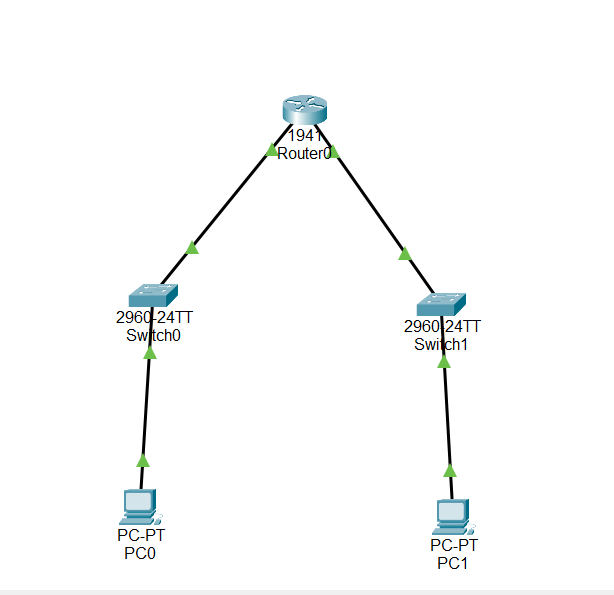
This topology is intentionally simple. The goal is not to build a complex network, but to observe how subnetting affects host addressing and communication between two networks.
IP Addressing Plan
The addressing scheme used in the lab is:
| Device | Interface | IP Address | Subnet Mask | Default Gateway |
|---|---|---|---|---|
| PC-A | FastEthernet0 | 192.168.10.10 |
255.255.255.192 |
192.168.10.1 |
| Router | G0/0 | 192.168.10.1 |
255.255.255.192 |
— |
| Router | G0/1 | 192.168.10.65 |
255.255.255.192 |
— |
| PC-B | FastEthernet0 | 192.168.10.70 |
255.255.255.192 |
192.168.10.65 |
The two PCs belong to different subnets:
PC-A
192.168.10.10/26
        ↓
192.168.10.0/26
and:
PC-B
192.168.10.70/26
        ↓
192.168.10.64/26
This is the key point of the lab.
Although both addresses start with 192.168.10, the /26 subnet mask places them in different networks.
Configuring PC-A
PC-A was configured with:
IP Address      : 192.168.10.10
Subnet Mask     : 255.255.255.192
Default Gateway : 192.168.10.1
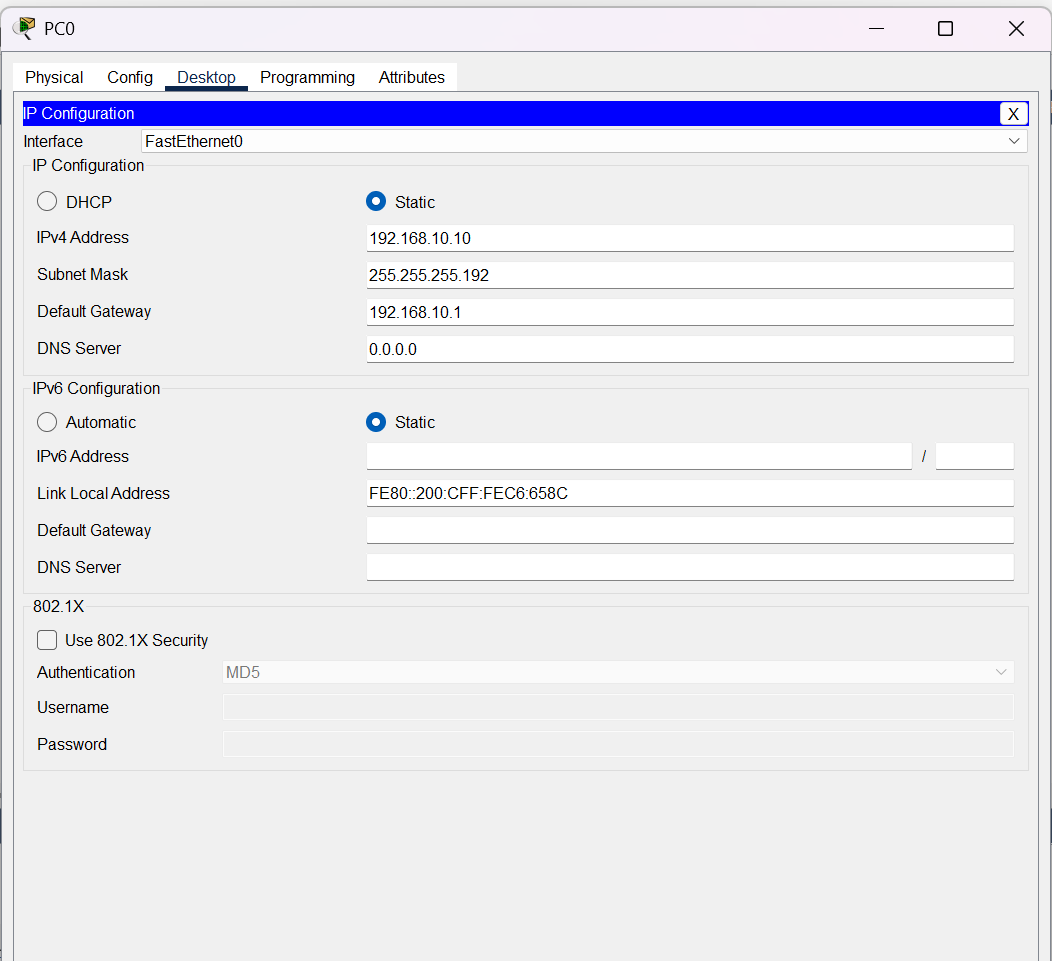
To verify the configuration from the command line, I also used:
ipconfig
The result confirmed:
IPv4 Address   : 192.168.10.10
Subnet Mask    : 255.255.255.192
Default Gateway: 192.168.10.1
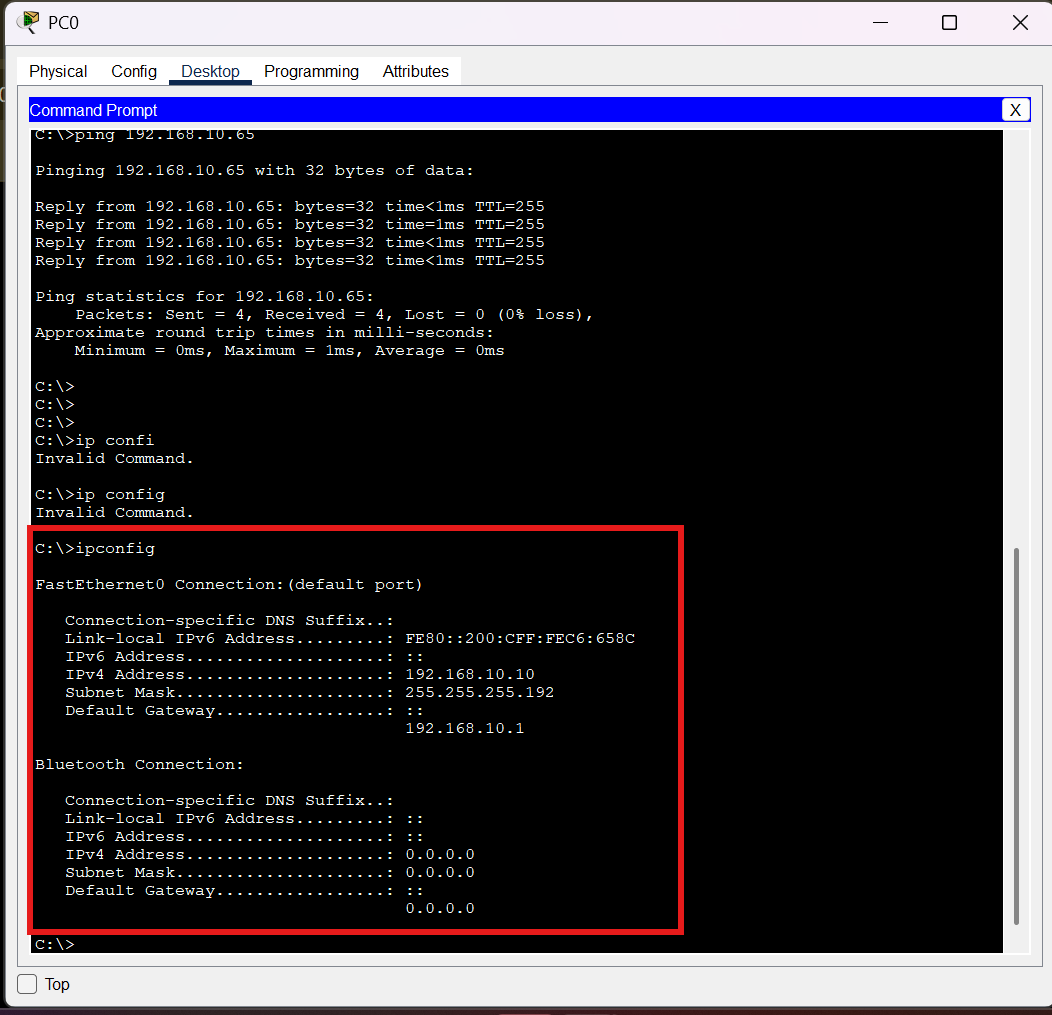
This confirms that PC-A is configured as a host in the 192.168.10.0/26 subnet.
Configuring PC-B
PC-B was configured with:
IP Address      : 192.168.10.70
Subnet Mask     : 255.255.255.192
Default Gateway : 192.168.10.65
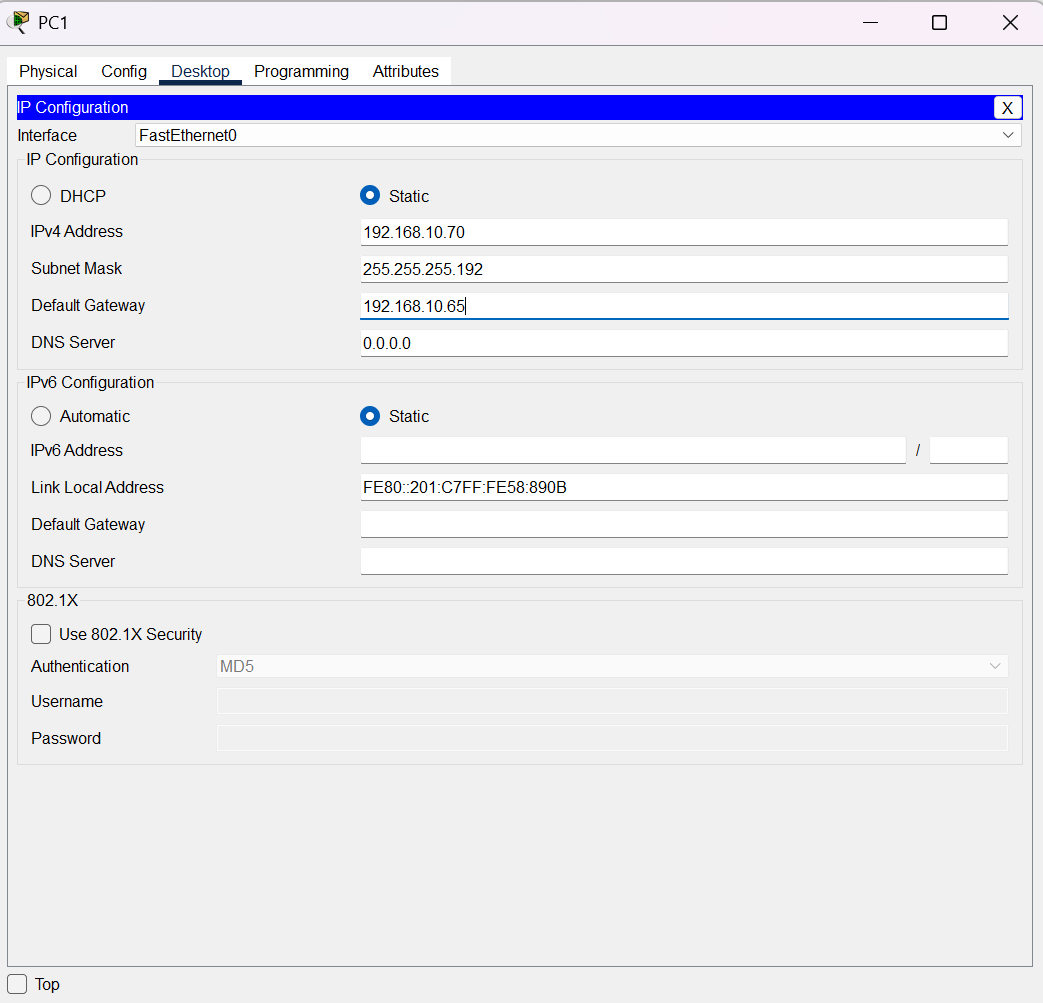
Based on the subnet calculation, 192.168.10.70/26 belongs to:
192.168.10.64/26
Therefore, using 192.168.10.65 as the gateway is consistent with the addressing plan.
Configuring the Router
The router provides the gateway for both subnets.
The interfaces were configured as follows:
enable
configure terminal

interface gigabitEthernet 0/0
ip address 192.168.10.1 255.255.255.192
no shutdown
exit

interface gigabitEthernet 0/1
ip address 192.168.10.65 255.255.255.192
no shutdown
exit

end
After configuring the interfaces, I checked their status using:
show ip interface brief
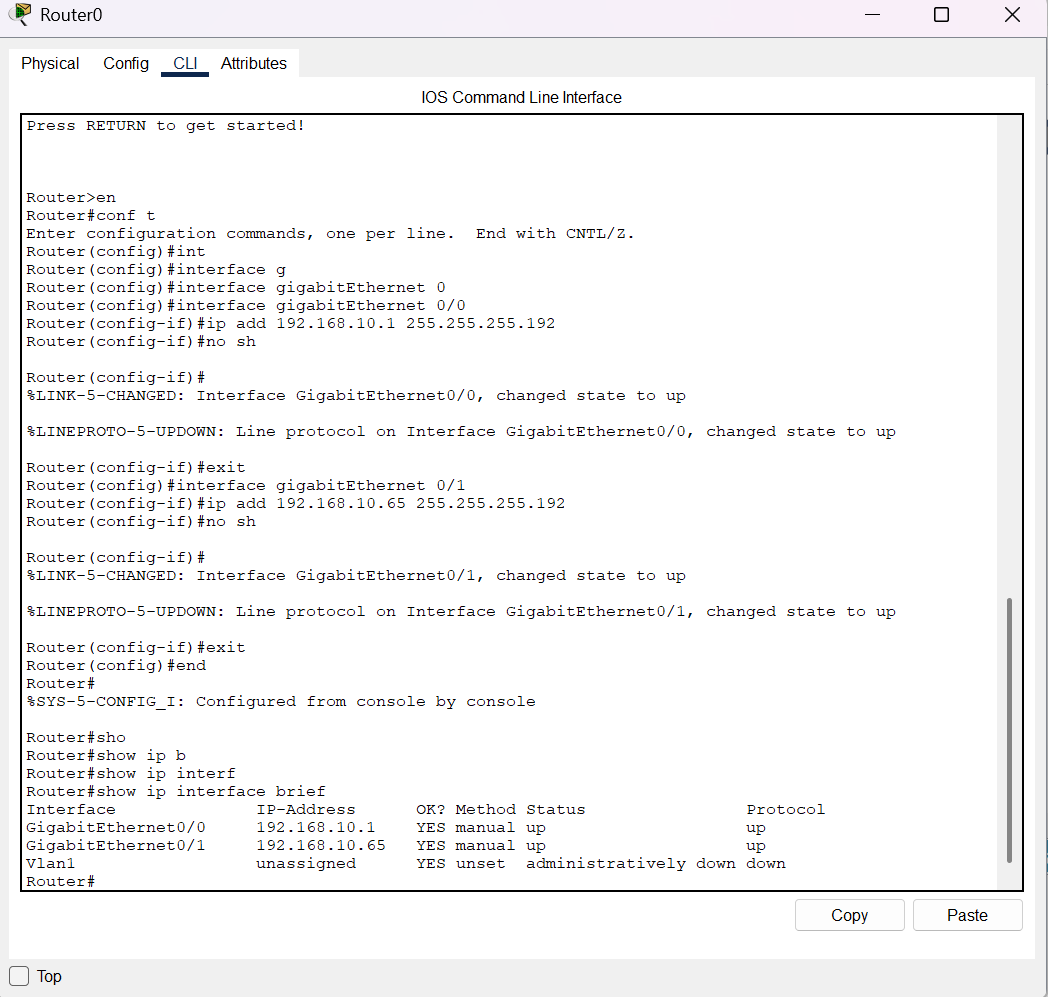
The important information to check is whether the interfaces are operational and whether the configured IP addresses match the addressing plan.
Verifying the Routing Table
Next, I checked the router's routing table:
show ip route
The relevant entries were:
C       192.168.10.0/26 is directly connected, GigabitEthernet0/0

C       192.168.10.64/26 is directly connected, GigabitEthernet0/1
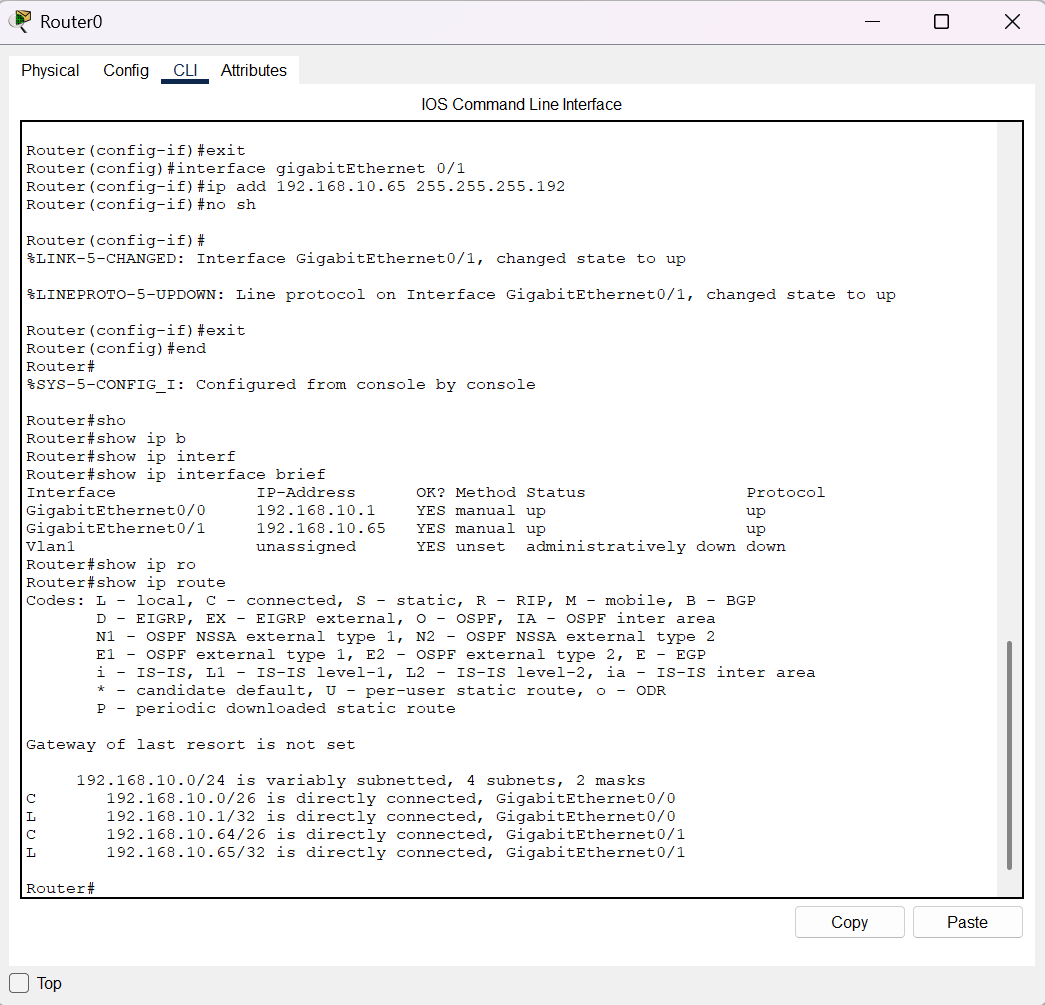
The C code means Connected.
This tells us that the router recognizes:
192.168.10.0/26 → G0/0
192.168.10.64/26 → G0/1
This is strong evidence that the /26 subnetting configuration is active on the router.
The routing table also showed:
Gateway of last resort is not set
That is not a problem in this lab. Both networks are directly connected to the router, so the router does not need a default route to reach them.
Testing Connectivity Between the Two Subnets
After configuring the hosts and router, I tested connectivity between PC-A and PC-B.
From PC-A, the destination was:
192.168.10.70
PC-A is in:
192.168.10.0/26
while PC-B is in:
192.168.10.64/26
Therefore, PC-A cannot treat PC-B as a local host in the same subnet.
The traffic needs to be sent to the default gateway:
192.168.10.1
The router then forwards the packet through its G0/1 interface toward:
192.168.10.64/26
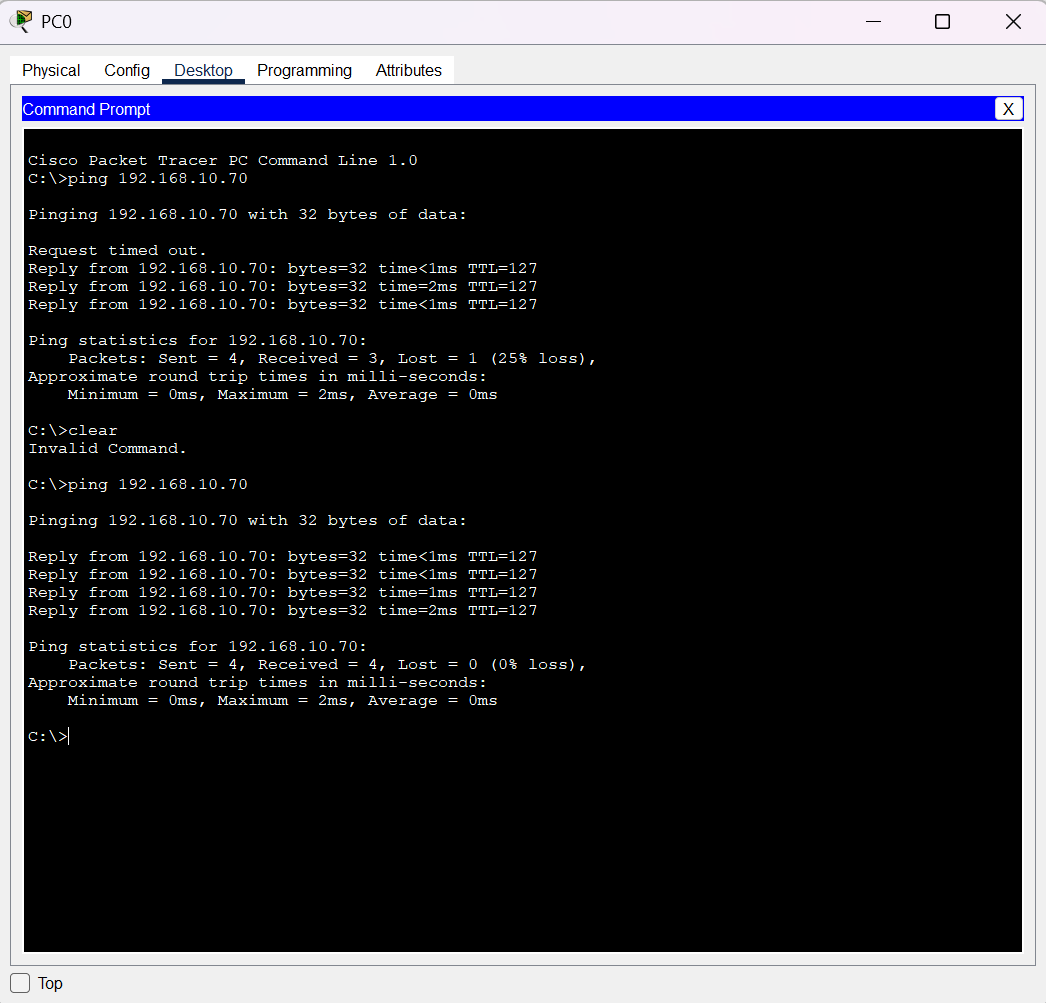
This test verifies that the two subnets can communicate through the router.
What Does ARP Show?
Subnetting also affects how a host uses ARP.
ARP, or Address Resolution Protocol, is used to discover the MAC address associated with an IPv4 address on the local network.
On PC-A, I checked the ARP table using:
arp -a
The result included:
Internet Address      Physical Address      Type
192.168.10.1          0001.64de.b701         dynamic
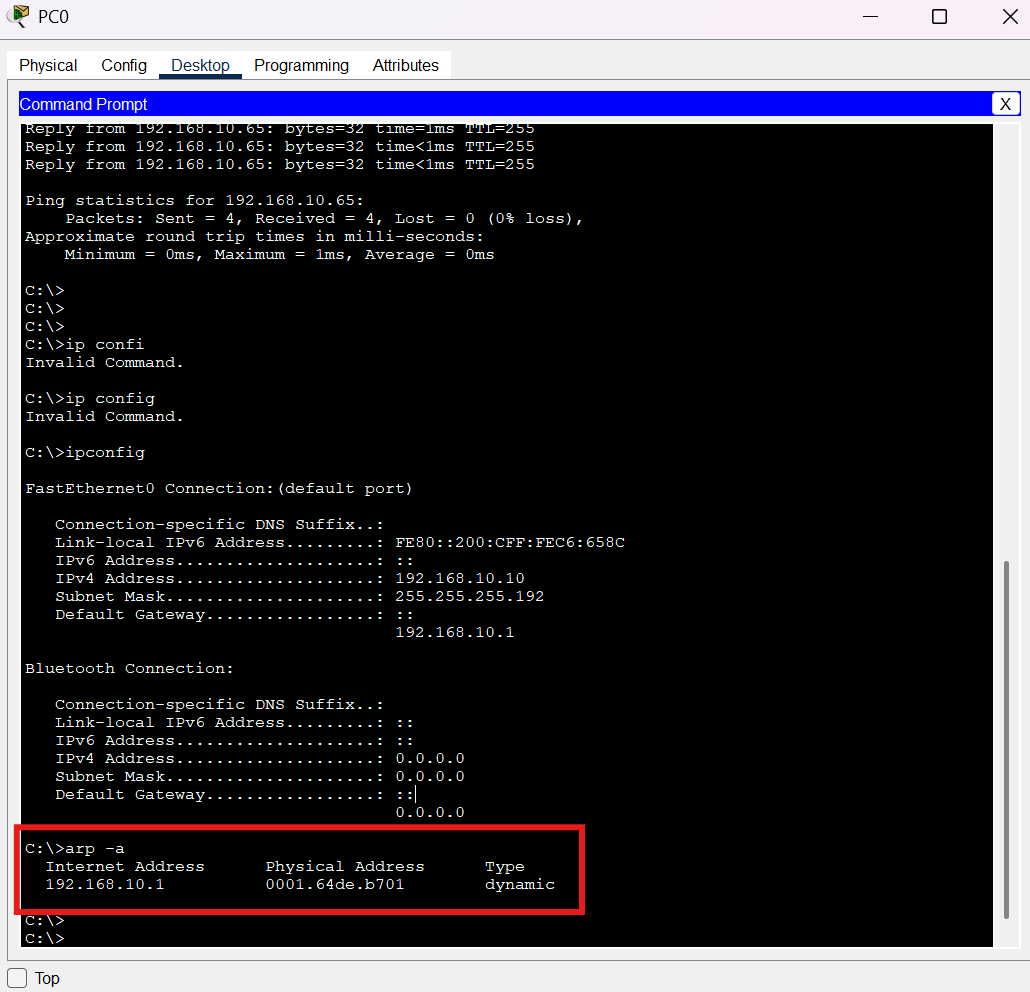
The important observation is that PC-A has an ARP entry for its default gateway.
PC-A does not need to resolve PC-B's IP address directly at the local Ethernet segment because PC-B belongs to a different subnet.
Instead, PC-A needs the MAC address of the router interface on its own subnet.
PC-B ARP Table
I performed the same check on PC-B:
arp -a
The result was:
Internet Address      Physical Address      Type
192.168.10.65         0001.64de.b702         dynamic
This matches the addressing design.
PC-B belongs to:
192.168.10.64/26
and its router interface on that subnet is:
192.168.10.65
Therefore, PC-B uses 192.168.10.65 as its default gateway.
How Subnetting Changes Packet Delivery
The lab demonstrates an important networking principle.
When PC-A wants to communicate with PC-B, it first uses its subnet mask to determine whether 192.168.10.70 belongs to the same network.
PC-A has:
192.168.10.10/26
which belongs to:
192.168.10.0/26
PC-B has:
192.168.10.70/26
which belongs to:
192.168.10.64/26
Because these networks are different, PC-A sends the traffic toward its gateway:
PC-A
192.168.10.10
     |
     | default gateway
     v
Router G0/0
192.168.10.1
     |
     | routing
     v
Router G0/1
192.168.10.65
     |
     v
PC-B
192.168.10.70
This connects the subnetting concept to the packet-flow topic discussed in my previous article.
Related: If you want to understand what happens to a packet as it moves through hosts, switches, and routers, see my previous article, Understanding Computer Networks: How a Packet Travels from One Host to Another.
What Happens If the Subnet Mask Changes?
To understand the effect of subnetting more clearly, I also experimented with changing the subnet mask on PC-A.
The original configuration was:
255.255.255.192
which is:
/26
I temporarily changed it to:
255.255.255.0
which is:
/24
This changes how PC-A interprets the network boundary.
With /26:
192.168.10.10 → 192.168.10.0/26
192.168.10.70 → 192.168.10.64/26
The hosts are in different subnets.
With /24, PC-A would interpret the destination differently because the entire 192.168.10.x range is considered part of the same /24 network from PC-A's perspective.
This experiment demonstrates why the subnet mask must be configured correctly and consistently. A mismatch can cause hosts to make different assumptions about whether a destination is local or remote.
After the experiment, I restored PC-A to the intended configuration:
IP Address      : 192.168.10.10
Subnet Mask     : 255.255.255.192
Default Gateway : 192.168.10.1
Troubleshooting the Lab
One useful lesson from this lab was that troubleshooting depends on understanding which device is responsible for which information.
For example:
Check the host configuration
ipconfig
Use this to verify:
IPv4 address
Subnet mask
Default gateway
Check ARP
arp -a
Use this to see IPv4-to-MAC address mappings known by the host.
Check router interfaces
show ip interface brief
Use this to verify interface addresses and operational status.
Check the routing table
show ip route
Use this to determine whether the router knows how to reach the destination network.
This separation is important when troubleshooting. A problem with a host's subnet mask is different from a problem with a router's routing table.
What I Learned From This IPv4 Subnetting Lab
Before practicing subnetting, it is easy to think of an IP address such as:
192.168.10.70
as simply a number assigned to a device.
The lab made the subnet mask much more meaningful.
With:
192.168.10.70/26
I can determine that:
Network   : 192.168.10.64/26
First host: 192.168.10.65
Last host : 192.168.10.126
Broadcast : 192.168.10.127
I can also understand why PC-B uses:
192.168.10.65
as its default gateway.
The subnet mask therefore affects more than IP calculations. It influences how a host decides whether traffic is local or needs to be forwarded through a router.
Conclusion
IPv4 subnetting determines the boundary between the network and host portions of an IPv4 address.
Using a /26 prefix with the 192.168.10.0/24 address space creates four smaller subnets:
192.168.10.0/26
192.168.10.64/26
192.168.10.128/26
192.168.10.192/26
Each subnet contains 64 addresses, with 62 traditionally usable host addresses.
In the Cisco Packet Tracer lab, PC-A uses:
192.168.10.10/26
and belongs to:
192.168.10.0/26
while PC-B uses:
192.168.10.70/26
and belongs to:
192.168.10.64/26
Because they are on different subnets, communication between them passes through the router.
The ARP tables provide another useful perspective: each PC resolves the MAC address of its local default gateway rather than treating the remote host as a directly connected host.
This is why understanding IPv4 subnetting is fundamental to networking. It connects mathematical IP addressing with real packet forwarding, routing, and network troubleshooting.
Frequently Asked Questions
What is IPv4 subnetting?
IPv4 subnetting is the process of dividing an IP network into smaller logical networks called subnets.
What is a subnet mask?
A subnet mask determines which portion of an IPv4 address represents the network and which portion represents the host.
What is a /26 subnet mask?
A /26 subnet mask is:
255.255.255.192
It contains 64 total IPv4 addresses and 62 traditionally usable host addresses.
What is a network address?
A network address identifies the subnet itself. It is the first address in the subnet and is normally not assigned to an individual host.
What is a broadcast address?
A broadcast address is the last address in an IPv4 subnet and is used to address all hosts within that subnet.
How do I find the network address of an IPv4 address?
Determine the subnet mask, calculate its block size, and find the subnet boundary containing the IP address.
For example:
192.168.10.70/26
has a block size of 64, so .70 belongs to the .64 subnet:
192.168.10.64/26
Why does a different subnet require a router?
A host can directly deliver traffic to destinations it considers local to its subnet. When the destination is on another subnet, the host sends the traffic to its default gateway so a router can forward the packet.
What's Next?
Now that the relationship between an IPv4 address, subnet mask, and network boundary is clearer, the next step is to understand ARP and MAC addresses in more detail.
That topic will connect subnetting with Layer 2 communication and help explain how switches and routers handle packets and Ethernet frames in a real network.